You finally convinced leadership to invest in an ERP system. The vendor demo looked amazing. Six months later, your warehouse team is still using Excel spreadsheets because the new system “doesn’t work right.” Your IT department fields 50 tickets daily about login issues. And that $200K project? It’s now pushing $400K with no end in sight.
This isn’t a horror story. It’s Tuesday for most companies implementing Enterprise Resource Planning solutions.
The truth is, ERP software challenges aren’t about the technology itself. They’re about the messy reality of connecting old systems, training humans, and dealing with costs nobody warned you about. Understanding these ERP integration issues and adoption barriers helps you spot problems before they spiral.
Table of Contents
ToggleKey Takeaways
- Old systems’ outdated formats block modern ERP integration.
- Employees resist ERP as they are used to spreadsheets.
- Hidden costs include data cleanup, training, and unmentioned customizations.
- Manufacturing ERP struggles with shop floor equipment.
Why ERP Integration Is So Hard
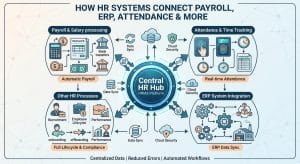
Connecting software sounds simple. It’s not. Your ERP system’s software must talk to dozens of other tools, and each tool comes with its own complexities and specifications.
The Legacy System Problem
Why is ERP integration so difficult with legacy systems? This is because old softwares speak different language than the modern ones. Your 15-year-old database uses outdated data formats. Modern ERP systems can’t read them without special translators.
Each old system needs custom connectors. This creates a messy web. When one link breaks, everything stops.
Common Integration Problems
What are the most common ERP integration problems? Here’s what companies face:
- Data doesn’t sync between systems in real-time
- Customer records look different in ERP versus CRM
- E-commerce orders don’t flow into inventory automatically
- Financial data needs manual entry across platforms
CRM and E-Commerce Connection Issues
ERP integration challenges with CRM/e-commerce platforms happen often. CRMs track relationships. ERPs track transactions. They organize information differently.
E-commerce sites update inventory every second. Your ERP might refresh hourly. This gap causes overselling. The ERP integration problems & solutions usually require extra software.
The User Adoption Crisis
The best ERP system is worthless if nobody uses it. ERP user adoption problems sink more projects than technical failures.
Why Employees Resist Change
Workers fear new software. They’ve mastered the old system. Learning again feels like starting over. They see extra work, not benefits.
Low ERP user adoption solutions begin with understanding this fear. If you ignore resistance, people find workarounds. They keep using spreadsheets secretly.
Training That Actually Works
Training and user onboarding for ERP fail when it’s a one-time event. People forget most of what they learn within a week.
Most training focuses on features. Employees need job-specific help instead. A warehouse manager needs different training from an accountant. Generic tutorials waste everyone’s time.
Hidden Costs That Blow Budgets
The hidden costs of ERP software SaaS surprise most companies. The license fee is just the beginning. Then come the bills nobody expected.
What hidden implementation costs should I budget for ERP? Plan for these extras:
- Customization to match your processes
- Additional user licenses as teams grow
- Premium support for faster help
- Third-party apps to fill gaps
Data Migration Nightmares
Data migration frustrations eat time and money. Your old data is messy. Duplicate records exist everywhere. Formats need conversion.
Companies discover errors only after going live. Then they hire expensive consultants. The total cost of ERP ownership includes years of cleanup work.
Customization Versus Standard Features
Comparing ERP customization vs standardization costs reveals a tough choice. Custom features fit perfectly but break during updates. Standard features limit flexibility but stay stable.
Most experts recommend using standard features. Only customize when absolutely necessary. This reduces long-term headaches.
Why 55% – 75% of ERP Projects Fail
ERP implementation failure reasons in 2026 go beyond technology. Poor planning kills projects before they start. Unrealistic timelines make success impossible.
Why do ERP implementations fail? Common reasons include:
- Underestimating testing time
- Skipping change management
- Choosing systems based on demos, not fit
- Ignoring employee feedback
Failed projects also lack clear ownership. Nobody drives decisions. Stakeholders disagree constantly. The project drifts without direction.
Solutions That Actually Work
Is ERP integration worth the cost? Yes, when done right. Modern approaches make connections smoother than ever.
Better Integration Methods
Cloud-based ERP system software integrates more easily than older versions. Pre-built connectors exist for popular tools. This reduces custom development needs.
What is the best way to integrate a legacy ERP with a modern CRM? Start small. Map only essential data first. Sometimes, phased retirement works better than forcing connections.
Improving User Adoption
How can companies improve ERP adoption? Show employees what’s in it for them. Does it reduce boring tasks? Can they work from home?
Involve users in testing. Their feedback improves the system. They become advocates who help train others.
Choosing the Right ERP System
Picking the right integrated ERP system prevents most problems. Rush this decision, and you’ll regret it for years.
| Factor | What to Check | Why It Matters |
| Integration | Pre-built connectors | Less custom work |
| Usability | Simple interface | Better adoption |
| Support | Fast response times | Less downtime |
| Training | Included resources | Lower hidden costs |
ERP integration challenges in manufacturing differ from those in retail. Manufacturing needs equipment connections. Retail needs point-of-sale integration. Choose ERP systems built for your industry.
Don’t rush vendor selection. Involve daily users in the decision. Test your actual processes, not demo scripts.
Conclusion
ERP software solutions work when you plan for problems. Integration difficulties, user resistance, and surprise costs are predictable. They have proven solutions.
Success requires realistic expectations. Don’t expect perfection on day one. Plan for a gradual rollout with plenty of support. Invest in your people, not just software.
Take three steps now. First, assess which systems must connect. Second, build a change management plan. Third, budget for hidden expenses. These actions create a foundation for successful Enterprise Resource Planning.
FAQs
- How to improve ERP user experience for my employees?
Create personalized dashboards showing only relevant information. Build searchable help guides inside the software. Gather feedback regularly and make visible improvements quickly.
- What hidden implementation costs should I budget for ERP?
Budget for data migration, custom integrations, extended training, temporary staff during transition, and consulting fees. Plan for productivity drops during the first six months.
- What is the best way to integrate a legacy ERP with a modern CRM?
Use middleware that translates between old and new systems. Map only essential data fields first. Run systems in parallel during transition. Clean your data before attempting any integration work.
- How much does ERP training really cost?
Training typically adds 15-20% to total implementation budgets. This includes initial sessions, refresher courses, documentation, and super-user programs for sustained adoption success.
- Why does ERP slow down reporting?
ERP systems often struggle with large datasets, causing delays in generating reports. Optimize queries and use modern cloud-based tools for faster performance.