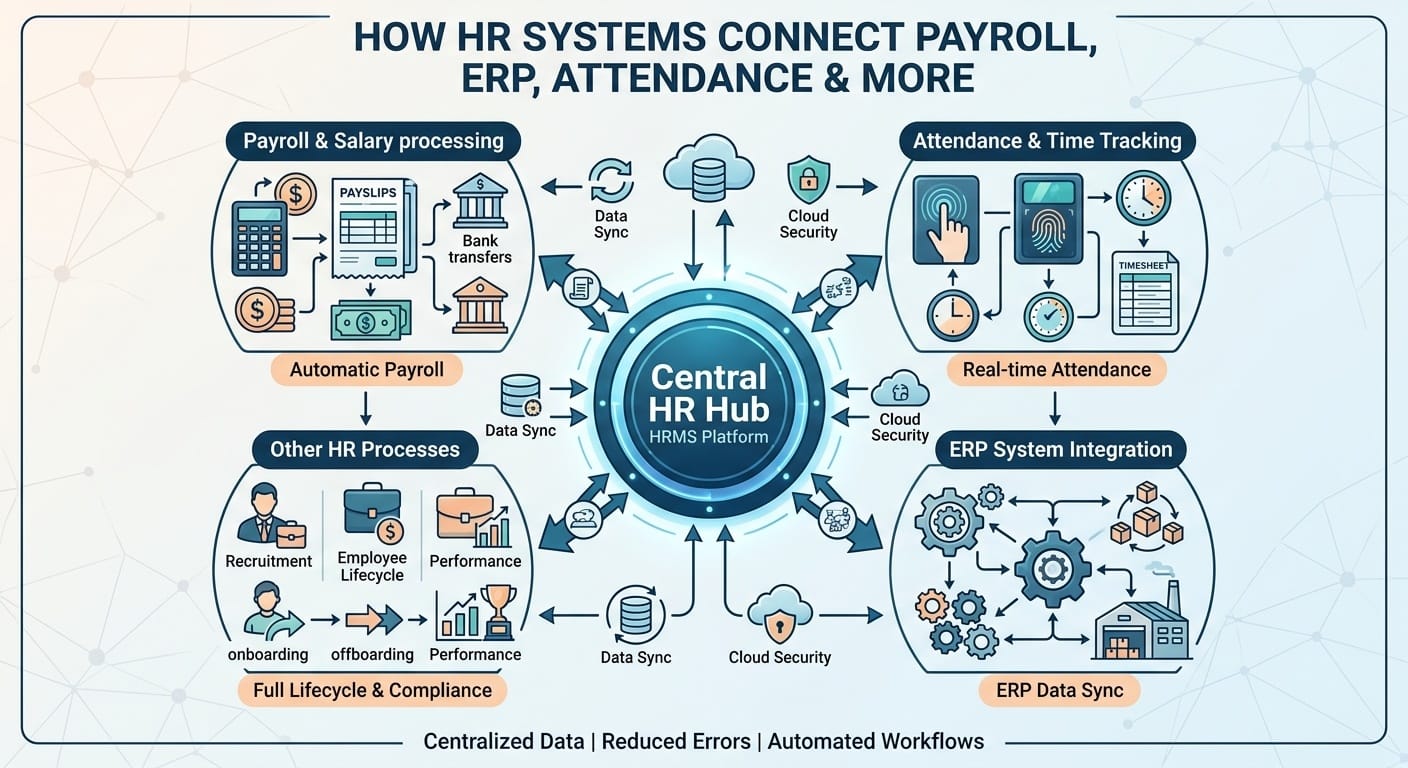
Your HR team enters an employee’s raise in one tool. Payroll never sees it. Next payday, the employee gets the old amount, and HR fields an angry email instead of doing real work. That’s what happens without HR system integration: the same employee record lives in five places, and none of them agree.
This mismatch causes real damage. Teams waste hours on repetitive HR tasks and chase down data synchronization problems, then still issue corrections. Our guide to payroll automation breaks down how this cycle starts, and this post shows how connected systems stop it.
Table of Contents
ToggleKey Takeaways
- Disconnected tools cause duplicate employee data and slow, error-prone payroll runs.
- HRMS integration links attendance, payroll, and records into one accurate source.
- AI HR analytics catches mismatched hours and pay before they cause problems.
- Choosing the right HR integration solutions depends on your existing tools, not trends.
Why Do Businesses Need HR System Integration?
Most companies start with separate tools: one for attendance tracking, one for payroll software, one for records. Each works fine alone. Problems start when someone moves data between them by hand. A missed update means payroll data no longer matches reality, and HR reporting difficulties follow close behind.
HR software solutions built to connect from day one remove that manual bridge. Information entered once updates everywhere else automatically.
Key Issues HR Automation Software Solves
HR automation software targets the exact pain points that slow teams down:
- Manual payroll processing that eats hours every pay cycle
- Duplicate employee data across separate tools
- Delayed payroll processing caused by late attendance uploads
These aren’t small annoyances. A single missed sync can trigger payroll calculation errors that take days to trace, and teams end up with real difficulty managing employee data across every disconnected tool.
How HRMS Automates Payroll Data Sync
Good HR payroll software treats attendance tracking, salary processing, and leave management as one connected flow, not three separate jobs.
From Clock-In to Paycheck
When attendance management and payroll share data automatically, employee attendance hours flow straight into salary processing. No spreadsheet exports or re-typing.
| Task | Manual Process | Integrated System |
| Attendance to payroll | Export, re-enter data | Auto-synced daily |
| Employee updates | Repeated in each tool | Entered once |
| Leave requests | Emailed, tracked separately | Logged and reflected in pay |
Research from ADP found nearly one in four payroll runs contain data errors or need correction, and most trace back to manual data entry.
Reduce Payroll Errors and Manual Data Entry
Yes, when payroll and HR software are properly connected. Removing manual re-entry removes the step where most mistakes happen.
Where Errors Usually Start
- Attendance hours copied incorrectly into payroll
- Pay changes updated in one system, forgotten in another
- Leave balances that don’t match final pay
This is where payroll system integration earns its keep. Fewer manual touches mean fewer chances for errors.
Improve Payroll, Attendance, and Employee Management With AI
AI-powered HR automation adds a checking layer on top of basic integration. AI attendance management software flags unusual clock-ins. AI payroll software catches pay amounts that don’t match hours logged. AI employee management software spots duplicate records automatically.
Intelligent HR software doesn’t replace your HR team. It flags what needs a human look, so people spend less time hunting for mistakes. See our AI HR analytics breakdown for real examples.
Choosing the Right HR Integration Solution
Not every business needs the same setup.
- List every tool that touches employee data
- Ask each vendor what syncs automatically, and how often
- Confirm who fixes the connection if it stops working
HR integration solutions should reduce your workload, not add a tool to babysit.
An Honest Look at the Limits
Integration isn’t magic. It won’t fix bad data already in your systems, and it won’t remove every judgment call your HR team makes. Some vendors advertise seamless syncing that actually needs manual mapping during setup, so test it before trusting it with live payroll.
If your current process is already a mess, connecting broken systems just moves the mess faster. Clean your records first.
Conclusion
Connected HR systems remove the manual work that causes most payroll mistakes. The real win isn’t the software itself. It’s the hours your team gets back and the errors that never reach a paycheck.
Start by listing where your data lives now. Then map which tools genuinely need to talk to each other. Finally, test any new integration with real data before switching over fully.
FAQs
1. What’s the difference between HRIS, HRMS, and HCM software?
HRIS stores employee records. HRMS adds payroll and attendance tools. HCM covers hiring, performance, and workforce planning in one system.
2. Can small businesses afford integrated HR and payroll systems?
Yes. Many providers offer scaled plans for small teams. Integration often saves more in corrected errors than it costs to set up.
3. Does HR software integration work with existing accounting tools?
Most modern platforms connect with common accounting software through built-in links or APIs, syncing payroll expenses into your books automatically.
4. How long does it take to set up HRMS integration?
Setup usually takes a few weeks, depending on how many systems you’re connecting and how clean your existing employee data already is.
5. Is employee data safe when ERP systems are integrated?
Reputable platforms encrypt data while it moves and at rest, and limit access by role. Always confirm a vendor’s security certifications before connecting sensitive payroll data.